Fusion - Legacy component
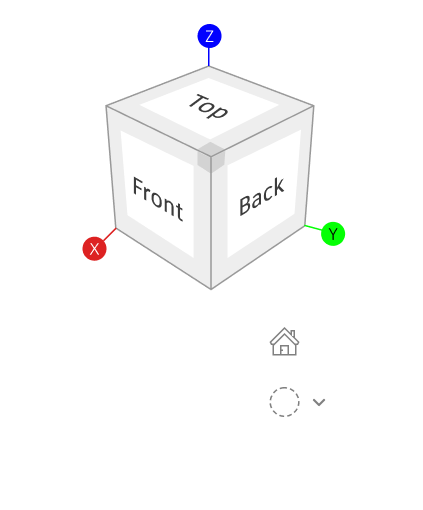
Adaptive Viewcube
Modernizing 3D navigation for touch and multi-device workflows

Problem context
ViewCube is a foundational navigation component across Fusion and multiple Autodesk products. Designed originally for mouse-driven desktop workflows, the legacy implementation does not translate well to touch environments.
On mobile and tablet, users experience small hit targets, imprecise interactions, and visual complexity that makes orientation and navigation error-prone. These gaps limit usability in touch-first contexts and create friction in critical 3D workflows.
My role
Lead Visual Experience Designer
Tools

Figma
Year
2025


Goals
Make ViewCube fully touch-friendly
Modernize the visual design
Preserve cross-platform consistency
Design a future-proof system
Reduce navigation errors and cognitive load
Task at hand
Reimagined ViewCube for touch by identifying usability gaps, refining interaction behaviours, and delivering a scalable solution across mobile, tablet, and desktop.

Autodesk Fusion

Autodesk Revit

Autodesk Maya
Research
Internal & external audit
Analyzed competitor patterns and product gaps while aligning with existing component standards.
[1] Rhino 3D

[2] Solidworks

[3] Onshape

Identified issues
Mixed Era UI patterns
Tool organization is not scalable
Inconsistent use of modality
Poor adaptation across device types
Overloaded toolbars and ribbon panels
Strategic:
Rollout plan
As we were dealing with a legacy component, it was essential to have a strategic rollout plan to avoid shocking the users and at the same time give them exactly what they need.

MVP: First draft
Same DNA, just adding
weave tokens
Here, I started by keeping the DNA of the cube the same in terms of look and feel, but I aligned it closer to weave


Design evolution
Viewcube over the years
The journey of viewcube over the years on how it got modified visually
but also added functionalities.

Very first viewcube

ADDED STATES AND ICONS

2010 - Rubicks cube

OBJECT 3D VIEW
Task at hand
Despite iterative evolution, the component remained desktop-centric and was not aligned with Weave design tokens.
MVP:Design explorations
These explorations were grounded in the original ViewCube, while integrating Weave tokens to ensure visual alignment with the broader UI system.



Top pick by stakeholders —
Designing for themes
Mobile first approach —
Ideal for scaling
WCAG: Minimum touch
target AA
A key challenge was scaling ViewCube for touch, as its size couldn’t accommodate a full 44 px target.
My Research led to a 24-pixel target with an 8-pixel buffer to reduce accidental taps.

Final design
A key challenge was scaling ViewCube for touch, as its size couldn’t accommodate a full 44 px target.
My Research led to a 24-pixel target with an 8-pixel buffer to reduce accidental taps.

Bottom sheet menu:
Viewcube faces
-
To preserve context and workflow continuity, the bottom sheet was limited to 50% height with icons paired to labels.
-
Lean tap targets made a bottom sheet necessary to reduce fat-finger errors.

Gestures
-
Single Tap for selection: Invoking a bottom sheet
-
Double-tap for default home view
-
Pinch to zoom
-
Pan and move for surface control
Setup sheet
This sheet displays crucial information, which is essential for production to be completed on time.

Dev handoff
Identifying gaps in multi-device consistency and workflow continuity across leading CAD platforms


[ 02 ]
Autodesk Fusion - Design system
Designed pixel-precise Fusion icons that scale across densities and light/dark themes, aligned with Autodesk icon guidelines.
[ Year ]
2025 - Present

[ 02 ]
Autodesk Fusion - Design system
Designed pixel-precise Fusion icons that scale across densities and light/dark themes, aligned with Autodesk icon guidelines.
[ Year ]
2025 - Present